Core Features

Transform your cursor with stunning visual effects and satisfying feedback

VibeCursor Visual Trails
Visual Enhancement

Smooth Visual Trails

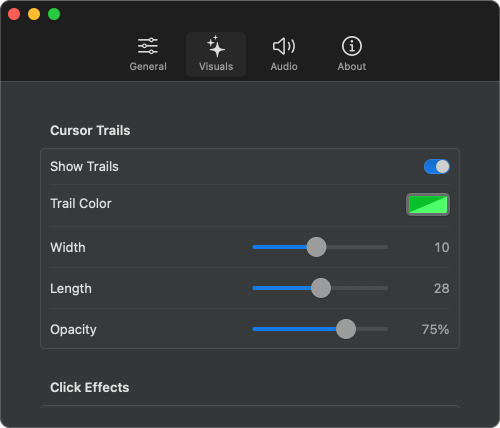
Add beautiful, smooth trails that follow your cursor movement. Customize color, width, length, and opacity to create your perfect cursor aesthetic. Works seamlessly across all your applications and displays.

  • Smooth, tapered trails that follow cursor movement
  • Customizable color, width, length, and opacity
  • Works across all applications and screens
  • Native macOS app performance
  • Support for multiple connected displays
Interactive Feedback

Click Effects & Animations

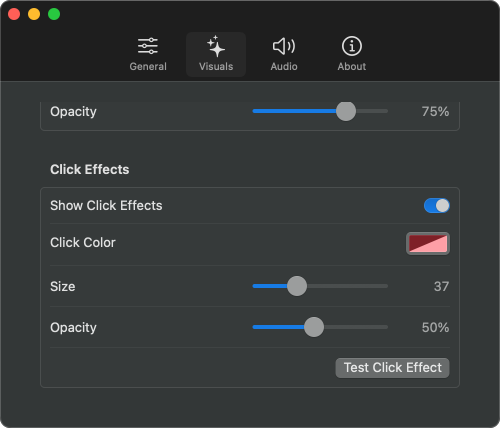
Add visual particle explosions or ripples when you click. Choose from various effects with customizable colors, sizes, and opacity to make every click satisfying and visually appealing.

  • Visual particle explosions and ripples on click
  • Customizable color, size, and opacity
  • Test click effects with a single click
VibeCursor Visual Effects Settings
VibeCursor Menu Bar Integration
Easy Control

Menu Bar Integration

VibeCursor stays in your menu bar for quick access to all settings. Toggle effects, adjust parameters, change languages, and launch at login with just a few clicks.

  • Always accessible from menu bar
  • Quick toggle app on/off
  • Multi-language support
  • Launch at login option
Audio Feedback

Satisfying Click Sounds

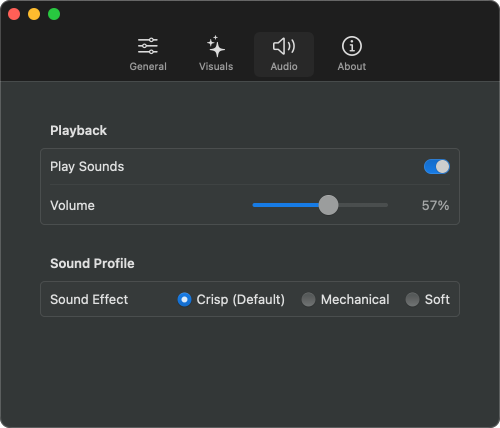
Add auditory feedback to your clicks with multiple sound profiles. Choose from Crisp, Mechanical, or Soft sounds, and adjust volume to create your perfect clicking experience.

  • Multiple sound profiles (Crisp, Mechanical, Soft)
  • Adjustable volume control
  • Toggle sounds on/off as needed
Audio Settings